drums · Web MIDI · runs in the browser
Drums
Drums is a browser app that accompanies an electronic drum kit. It follows your tempo, learns the repeating pattern of each drum you play, and answers with bass, chords, arpeggios, riffs and bursts on separate MIDI channels, for the sampled instruments in your DAW. It is one page of plain ES modules: nothing is uploaded and there is no build step.
No kit to hand? Try a groove in the app plays a demo, and the keyboard keys Z–, are pads.
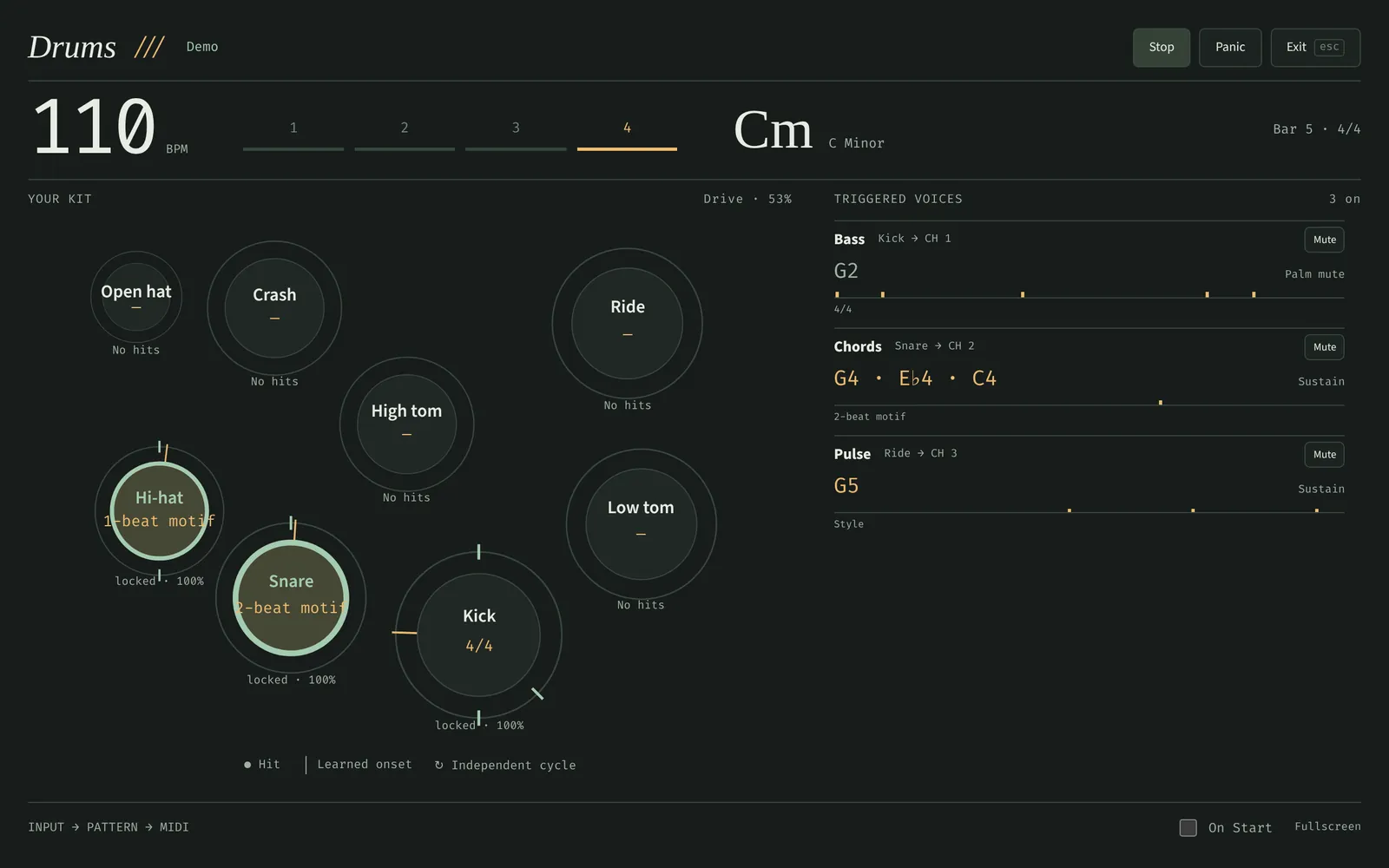
How a hit becomes a band
Every MIDI note from the kit is mapped to a piece and read by four listeners at once. One owns time: a tempo follower turns a pulse you choose into a single quarter-note clock. The others own shape: a learner per piece finds the cycle that drum repeats, an intensity tracker follows how hard and how often you play, and a harmony grammar decides when the chords should move. The instrument rack turns all of it into notes and articulation keyswitches, and a scheduler sends them, timestamped, to your DAW.
Finding the tempo
You tell Drums which drums keep time (hi-hats, kick, snare, ride, the kick and snare together, or every hit) and how many grid notes make a beat. Then one of two methods reads the clock.
Steady pulse
Every hit is the next grid step. That suits one timekeeper, an eighth-note hi-hat or a ride, and handles swing. It is what single sources use by default.
Groove grid
Hits land on a grid, with rests and mixed pads. Drums merges hits closer than the merge window (a flam, a kick under a hat) into one onset, then looks for the coarsest step that explains nearly every gap between onsets and reads it as one grid note.
The candidate tempos run from 40 to 240 BPM in 0.4% steps, and a gap counts as explained when it is within a quarter step, or 25 ms, of a whole number of steps. The winner is refined by least squares and rejected if its support falls below 0.7 or if one gap length is off by a consistent amount, which is what swing misread as a straight grid looks like. Once a tempo is established, a reading at ½, 2, ⅓, 3, ¼ or 4 times it is taken as a change of subdivision, not a tempo jump, so a run of eighths or a 32nd fill doesn't double the band.
- Measured. In an offline sweep of twelve seeds, five grooves, five tempi and 5 or 10 ms of jitter, 587 of 600 fits were within 2%; the misses were a few BPM off, never an octave. A fit costs about 0.12 ms for 96 onsets.
- Followed, not chased. After the first lock, changes must be sustained, then slew at most 1.5% per update (3.5% when Responsive). Small jitter is ignored, there is no per-hit phase tugging, and Lock tempo freezes it.
- One click to fix an octave. Half time ½× and Double time 2× move to the next coarser or finer grid in Follow, or halve and double the BPM in Fixed tempo; both are MIDI-mappable.
- Quantised on request. Detected tempos round to 10 BPM steps by default, pulling the band onto a tempo grid; turn it down or off for closer following.
Learning each drum's cycle
Tempo and rhythm are separate questions. Each drum piece gets its own model, fed unsnapped beat positions and velocities, which looks for the shortest cycle that repeats: onsets, rests and accents compared over up to four completed cycles, from a 256-hit history per piece. A lock needs at least three cycles of sustained evidence, survives fills and silence, and only changes after sustained contradictory playing; Hold freezes it. Each band lane then follows the drum you pick: by default the bass follows the kick, the chords the snare and the pulse the ride.
Automatic cycles run from 1 to 11 quarter notes, including the halves (2½, 3½, 4½, 5½), on quarters, eighths, sixteenths, triplets, sextuplets, quintuplets, septuplets and tuplets such as 3:2, 5:4 and 7:4; explicit meters reach 13/16, 15/8 and 16/4. Drums is honest about what timing cannot tell it: a three-beat cycle is shown as 3/4 · 6/8, uniform quarters as an N-beat motif rather than a bar, and a fit percentage as agreement, not certainty.
The band
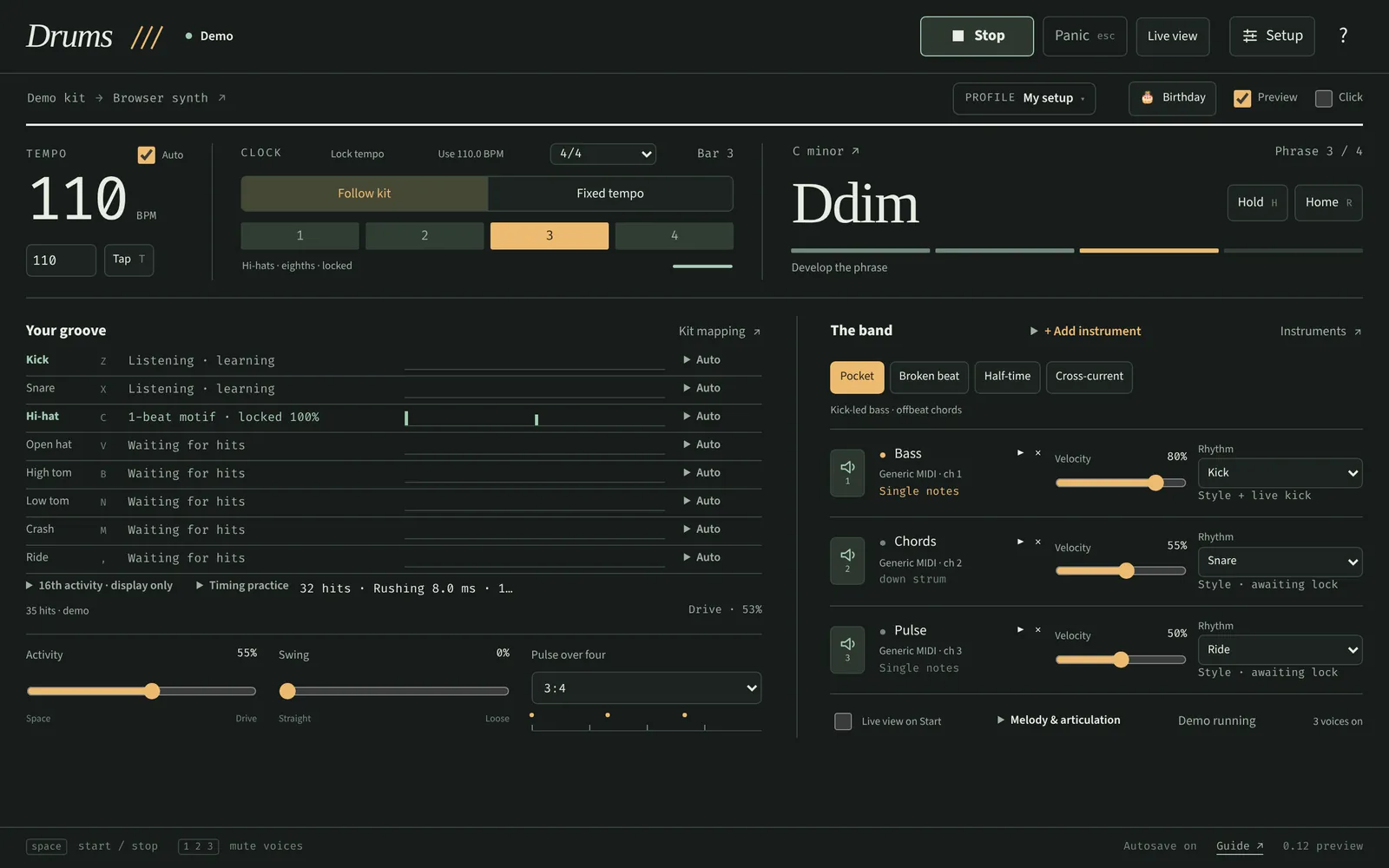
An instrument rack
Up to fifteen entries on their own MIDI channels (channel 10, drums, excluded): bass lines, chord layers, arpeggiators, melodic lines, drones, riff and chug sequencers, Euclidean rhythms and kit-triggered instruments. Each has its own rhythm source, register, melody, gate, voicing and articulation. Templates include a kick-triggered guitar, a 7/8 chug guitar and a four-part Heavy rig: a kick-locked gallop, a thirteen-sixteenth polymeter riff, snare tritone stabs and crash sub-drops, in Phrygian with heavy harmonic shifts. All patterns are original.
Harmony that follows the playing
A bounded grammar watches drum density, tom fills and crash accents: busy bars open the harmony, sparse bars hold it, and phrase endings lead back to the tonic, with a leading tone on minor cadences. A fill before a phrase boundary can visit the relative key or a fifth away, and the next phrase resolves home. Changes are bar-quantised, and the reason for each is shown.
Odd bars, breakdowns and sections
The whole band can play in 7/8, 13/16 or an Auto meter taken from the snare's locked cycle. A half-time, heavy passage is detected as a breakdown, after which guitars chug the home root or a breakdown profile takes over until the backbeat returns. Profiles chain into song sections that switch on the next bar, and Birthday mode turns the band into Happy Birthday in your key.
Bursts
A kit-triggered instrument fires 1 to 32 notes per hit, or a cycle of counts such as 1,2,3,2, timed as sixteenths, triplets, quintuplets or a whole bar of a chosen meter, at the tempo captured when the group starts. A ride hit becomes a triplet figure; a kick becomes a pair; each entry advances its own cycle once per accepted hit.
Talking to real instruments
The sound comes from your DAW: sampled guitars and basses in Kontakt, monitored on the channels the rack sends. Articulation (sustain, palm mute, dead notes, harmonics, power chords) is chosen by tracked intensity or a phrase, and sent as a keyswitch on the lane's own channel ahead of the note.
| Articulation | DjinnBass 2 | Shreddage Argent |
|---|---|---|
| Sustain | 0 | 0 |
| Palm mute | 17 | 1 |
| Staccato | — | 2 |
| Dead / choke | 3 | 7 |
| Harmonic | 8 | 9 |
| Power chord | — | 3 |
| Muted power chord | — | 4 |
Argent follows its documented default latch map, with sustain velocities capped at 116 to stay clear of its rake and pinch zones. The DjinnBass subset is cross-checked against a community map; verify both against your own patch.
- Software scheduling. An 8 ms foreground timer sends timestamped MIDI within a 25 ms horizon; every future note waits in a queue the app owns, so mute and Panic cancel its own notes and nothing else. It never calls
MIDIOutput.clear(), which some MIDI bridges break. - MIDI clock out. 24 PPQN, Song Position and Start with the band, Stop on Stop, following the tempo continuously, to the band's port or a separate one your DAW syncs to.
- Your feet are controllers. Spare pads, a keyboard or a foot controller can trigger any of the named performance actions (transport, tap and target tempo, lock, half and double time, styles, lane mutes and velocities, melody, sections): pick the action, hit the pad, save. Learning never runs an action, overlapping triggers are refused, and only the performance registry is bindable: no imports, resets or permission grants.
Limits
A rhythm partner that keeps playing when it shouldn't is worse than none. Drums stops its output when the tab is hidden, a device disconnects or its timer stalls for more than 180 ms, and after two silent bars in Follow mode; a fresh Start is always needed, and nothing is ever replayed. Silence alone never stops the band in Fixed tempo: resting parts keep their last usable pattern.
| Owned MIDI notes | 32 | Recent hits | 128 |
|---|---|---|---|
| Preview voices | 64 | Timing samples | 256 |
| Control bindings | 64 | Queued commands | 32 |
| Harmonic context | 8–9 bars | Imported settings | 128 KiB |
Stop and Panic release only notes this tab owns, keyswitches included; there is no global All Sound Off, MIDI thru or sysex, and same-named input and output ports are refused to avoid feedback. Kit maps, racks, profiles and bindings live in the browser's local storage, move between browsers as one validated JSON file, and never leave the machine.
Connect a kit
- Open Drums in Chrome or Edge. Web MIDI needs a secure page, which the published app is.
- Setup → MIDI. Connect, choose the kit as input and a separate output port: a loopMIDI port on Windows, the IAC bus on macOS.
- Load instruments in the DAW on that port, monitoring channel 1 for bass, 2 for chords and 3 for the pulse (or whatever your rack uses).
- Map the kit. General MIDI kits work as they are; Learn kit step by step captures one pad at a time for anything else.
- Start. Follow kit waits for your first hit; Fixed tempo plays at the target BPM. Keep a steady anchor (hats, or kick and snare) while confidence builds.