gfxsh · Rust · a VT emulator · Kitty graphics
gfxsh
gfxsh draws an unmodified zsh session as graphics. It runs zsh in a pseudo-terminal, follows it with its own terminal emulator, and paints the screen through the Kitty graphics protocol: each command becomes a panel showing its exit status and duration, the prompt is a card that responds as you type, and an animated background sits behind it.
gfxsh                         # your $SHELL; zsh gets semantic blocks
gfxsh --background nebula
gfxsh settings                # live editor; the session behind it is the preview
gfxsh demo --out demo.png     # an offscreen render, no terminal needed
gfxsh doctor                  # what this terminal supports
Three looks
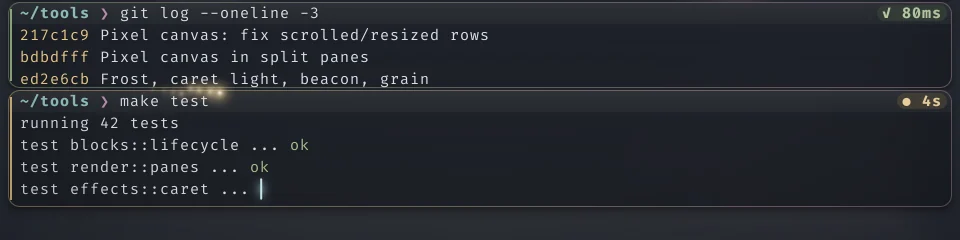
aurora · glass card · bloom caret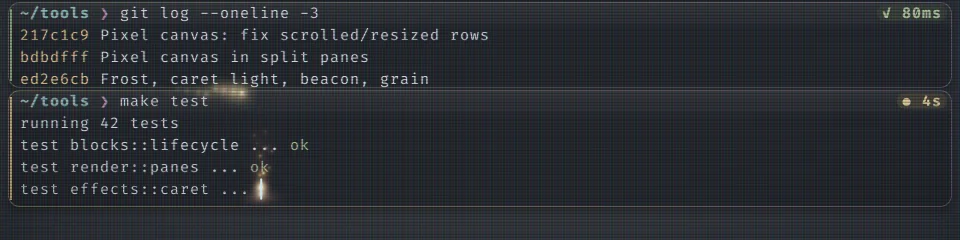
synthwave · CRT scanlines and mask · ember caret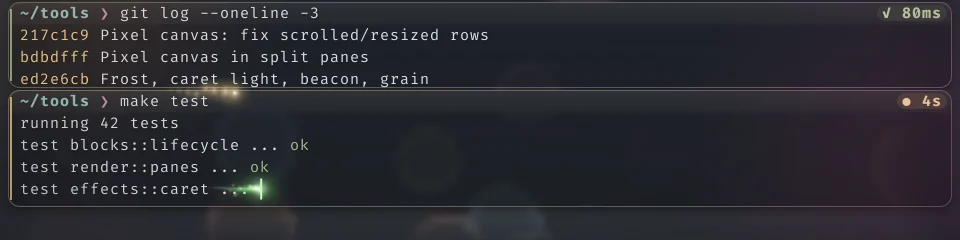
bokeh · holographic card · comet caret · light sweepRendered for this page by gfxsh demo from three configs; each image is the lower half of the scripted session.
How it works
gfxsh is a terminal inside your terminal. Nothing it draws is text: each screen row is a cell-aligned image, so it can give a command's output rounded glass, drop shadows and light, while your shell, its theme and your programs see an ordinary terminal.
.zshrc through a temporary ZDOTDIR, from precmd, preexec and a composing zle hook, so prompt themes such as powerlevel10k work unchanged.- Cheap redraws. Rows are cached by content, scrolling re-places cached rows, overlays are separate layers, and the scene is diffed against what is already on screen so only changes are sent.
- Smooth at any size. Panels are signed-distance shapes, and Powerline separators, box drawing and block elements are drawn as shapes that fill their cells, so prompt segments meet at any line height.
- Full-screen programs too. vim, htop, less and fzf get one glass pane, the background and the caret in the program's own cursor shape; their key and mouse modes are mirrored to the real terminal so they behave natively.
- Programs' images. gfxsh implements the Kitty graphics protocol itself for the programs it runs, so
icat, yazi and image.nvim draw inside their command's pane and scroll with its text.
Command blocks
Because gfxsh knows where every command and its output are, it can act on them. Ctrl+G, or a click on a command's header, enters block mode: j/k move between commands, y copies an output, Y the command and output, c the command line, and e puts a command back on the prompt to edit. A right-click menu does the same, and copying goes through OSC 52 so it reaches the right clipboard over SSH.
Inside tmux, tmux -CC makes gfxsh the tmux client, as iTerm2 does: each pane gets its own emulator and renderer, with its own command blocks and caret, and every key goes through tmux's own key tables, so your prefix and bindings work. In herdr, images are padded to whole cells; in tmux each placement is cropped to its pane and hidden when the pane isn't visible.
Configuration
| Backgrounds | aurora · nebula · waves · grid · stars · plasma · bokeh · synthwave · rain · fireflies · static · none |
|---|---|
| Prompt cards | glass · neon · outline · solid · minimal · pill · holo · rail · crt · hud |
| Carets | bloom · beam · block · underline · outline · halo · orb · comet · prism · pulse · ember · plasma |
| Running light | orbit · sweep · pulse, in amber, the accent, a rainbow or any colour |
| Lighting | glyph shadows, glow, chromatic fringes, a glass sheen, light leaks, vignette, film grain |
| CRT | scanlines with a rolling refresh band, an aperture-grille mask, a curved frame |
| Finish | a green or red border flash; optionally a glitch on a failed command's rows |
gfxsh settings edits all of it live: inside a gfxsh session the running shell behind the editor is the preview, and a preview column replays a scripted session (a listing, a failing test run, a streaming build) with the real effects.