Terminal UI
Cacophony provides two terminal frontends: a full operations console (caco tui) and a narrower hands-free interface (caco choices tui).
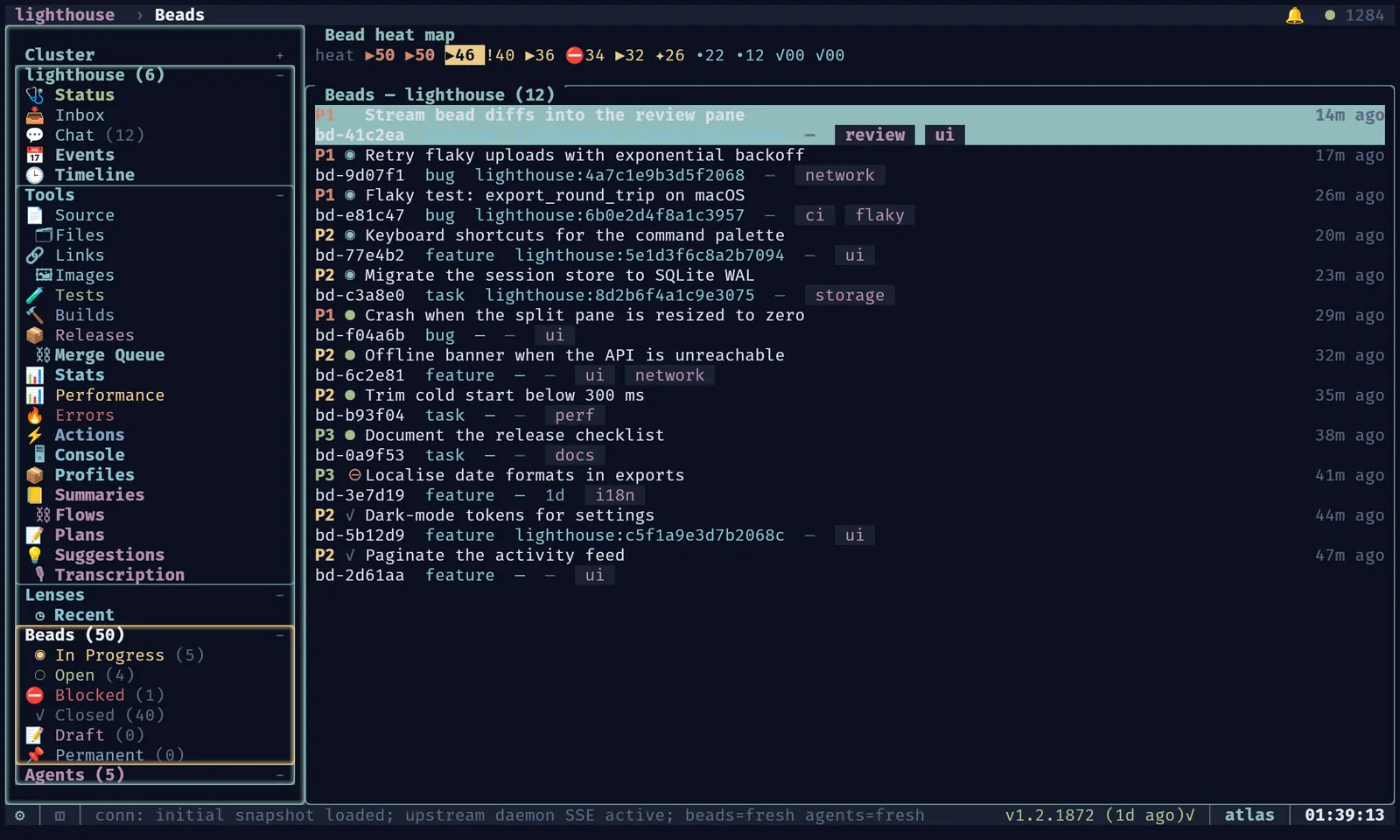
Main TUI (caco tui)
Launch Options
| Flag | Description |
|---|---|
NODE="example-node"; caco tui --node "$NODE" | Run the TUI on a remote node via SSH |
caco tui --no-gfx | Force ASCII-only mode (disable kitty graphics detection); per-project graphics overlays and live reloads cannot re-enable graphics in this mode, though non-backend UI such as the FPS toggle still updates. On constrained/mobile hosts the TUI uses a current-thread async runtime, so thread-aware tools such as htop may show repeated caco tui --no-gfx helper-thread rows; check PID/TID mode before assuming duplicates. |
PROJECT="project-name"; caco tui --project "$PROJECT" | Open in single-project workspace mode |
VIEW="@project#view"; caco tui --view "$VIEW" | Open saved view by name/index. Supports project:view, @project#view, @node:project#view, and caco tui @project#view. |
caco tui --section Stats | Open directly into a named Cluster sidebar section (Nodes/Stats/Agents/Status/Logs) by sidebar label, regardless of the last persisted project workspace. Add --project NAME only to resolve a project-scoped row instead. |
caco tui --global tui.graphics.enabled true | Repeatable launch-time globals override; deep-merges on top of config globals before template resolution |
YAML='tui: { graphics: { enabled: true } }'; caco tui --extra-config-yaml "$YAML" | Repeatable YAML literal or dotted-key override applied on top of loaded config |
caco tui --gfx-quality 0.75 | Graphics quality (1.0 = lossless default, 0.0 = max compression) |
--no-animation | Disable animations while keeping kitty graphics, images, and other rendering |
--debug | Enable verbose frame telemetry and detailed graphics perf instrumentation |
--debug-gfx | Alias for debug mode focused on outer-TUI Kitty graphics lifecycle inventory/orphan diagnostics; hosted PTY and nested agent tmux graphics remain outside this registry. |
Layout
Two-pane workspace:
- Left pane: Collapsible global navigation tree
- Right pane: Focused content view
Project workspaces can be opened as header tabs. Press W to switch workspaces, and press Ctrl-w to hide the current project workspace while preserving its state for restore when you reopen it later.
Press Ctrl-R to request a full TUI process restart/re-exec.
The TUI persists workspace state, tears down terminal/PTY resources cleanly, and returns through the same restart outcome used by update/config restart flows.
When a tmux, shell, or SSH pane is attached, Ctrl-R is forwarded to the inner pane; detach first with Ctrl-G when you want to restart the outer TUI.
Attached-pane control-letter handling also normalizes enhanced-keyboard variants such as Ctrl-Shift-C and Ctrl-Shift-G, so platform modifier reporting differences still deliver interrupt/detach semantics reliably.
Navigation Tree
- Cluster — main status plus Inbox, Chat, Events, Timeline, Summaries, Nodes, Beads, Agents, and Tools.
- Cluster > Tools — operational tools such as Files, Links, Audio, Prune, and Stats.
- Each project as a top-level section, containing:
- Status — project overview and checkout health
- Inbox and Chat — project-scoped operator messages
- Timeline — project activity timeline
- Beads — project beads view
- Tools — Source, Files, Links, Tests, Builds, Releases, Performance, Errors, Actions, Console, Profiles, and Summaries
- Machine groups with agents stratified by machine and lifecycle group
All sections are collapsible, and collapse state persists across restarts. Selection state is preserved unless the selected item disappears. Cluster > Nodes, Tools and Agents start folded the first time, so the project rows are visible on a laptop-sized terminal; a group you expand stays expanded.
Active unresolved choices are treated as operator-decision blockers, not routine inbox items.
Async caco decision items stay batch-reviewable in a dedicated Decisions section beside Choices; both resolve by option or freeform text, and x discards unanswered.
The header shows pending-choice (❗) and pending-decision (⚖) counts; clicking it opens Choices, or Decisions when no choice is active, and each count clears once its items resolve.
Snapshot Freshness and Cache Fallback
The TUI caches the last fully fresh /api/v1/ui/snapshot locally, so it opens instantly and stays usable when the daemon is slow or degraded.
- Warm start: same-host launches may also load a newer daemon's bounded
daemon/state/fleet-snapshot-lkg.json, marking beads and agents stale; a missing or invalid file is ignored. It replaces neither the TUI's layout caches nor the snapshot and/api/v1/ui/streampaths. - Degraded snapshots overlay fresh config, projects, services, hooks, actions and notifications, and keep cached beads or agents only for the stale domains. Live agent rows with attach metadata override cached ones, and a degraded response never overwrites the fully fresh cache.
- Beads: a fresh bead snapshot drops cached rows that are gone, so closed or draft work can't reappear as open. Per-project totals are fetched separately from the visible rows (closed and draft history loads lazily), and a failed remote refresh keeps the last complete totals and marks beads partial. Totals match
caco bd status --json: they include merging and permanent beads and exclude deleted ones. - Daemon side: snapshots are prewarmed at the active cadence while requests or stream subscribers are recent, and at most every ten minutes when idle. Only structural changes are persisted, and checkout status is cached for a minute. Node status reports prewarm mode, last demand and cache hits.
Quick Open (Ctrl-P)
Outside active text inputs, Ctrl-P opens the global fuzzy picker. Type to filter grouped results; Up/Down selects, Enter opens, and Esc dismisses.
The picker searches across Actions, Recent Actions, Projects, Agents, Beads, Views, Scratchpads, and Profiles. Safe rows (Open Feed, Open Logs, Open Actions, Open Scratchpad) navigate to existing panes without mutations. Recent-action helpers show bounded, deduplicated, most-recent-first action IDs in compact rows and support reset; they neither persist state nor invoke actions.
Views opens cluster and project destinations (see Content Views below): Chat, Inbox, Beads, Agents, Nodes, Stats, Status, Logs, Profiles, Summaries, Timeline, Events, Files, Links; and per-project Overview, Source, Performance, Errors, Tests, Builds, Releases.
Content Views
Startup and standalone attach chrome can warm-start from the global cached UI snapshot while fresh daemon data loads. On Unix, same-daemon TUIs share a best-effort local UI-stream broker; set CACO_TUI_SHARED_UI_STREAM=0 for diagnostics.
| Selection | Content Pane Shows |
|---|---|
Cluster / Cluster > Status | Cluster health, services, recent actions, aggregate state. Status subpanels can be collapsed or expanded by clicking their headers; Repairs and Persistent Agents start collapsed, while collapsed panels show a compact header and hint without body rows. Placement readiness and bead-bisect helpers render supplied status/progress/result rows only; they do not score placement, contact peers, spawn agents, file follow-up beads, or run a bisect. The Services panel advertises the canonical lifecycle path (! caco service status, with load/restart examples when discovery is empty) rather than inventing private TUI-only service repair commands. |
Cluster > Chat | Global chat; updates reconcile changed/removed bubbles while unchanged images remain resident |
Cluster > Inbox | Global inbox with dedicated Choices and Decisions sections; active options and freeform responses resolve in place through the matching API, and prompt focus retires stale graphics |
Cluster > Events / Timeline | Global event and activity timelines |
Cluster > Notifications | Daemon-side alerts with unread counts. a acknowledges the focused notification and A acknowledges every notification on the node in one bulk request, so a new node's backlog clears at once. The empty state advertises ! caco notify send --title ... --body ... for creating notifications without leaving the TUI. |
Cluster > Nodes | Local-node-first cluster node list with health/freshness details and per-node Status, Chat, and Agents entries. When tall enough, the view draws daemon-provided topology from /api/v1/ui/snapshot: direct/relay edges, dynamic markers, peer version/config-hash detail, and the active beads-primary crown. Topology-only nodes remain visible while probes settle; reachable is healthy, while settling and mismatch are degraded/in-progress. Wide terminals add an Edge Health / Activity pane. Node Chat filters the global chat timeline to that node and sends through the canonical node-target messaging path (caco msg send-node --global), with the composer labeled as node broadcast rather than a generic project/global broadcast. |
Cluster > Stats | Unified fleet stats from /api/v1/stats: compute/storage rollup, per-node sysinfo, token usage by project (including cached versus fresh input/output), and bead throughput (closed-rate plus time-series), with sparkline/proportion-bar graphs and window/node filters. |
Cluster > Summaries | Global recorded-session summary browser with list/detail panes and filters |
Project Tools > Summaries | Project-scoped recorded-session summary browser that lists only that project's recorded summaries with the same filters and detail pane |
Cluster > Tools > Files / Links | All-project file-cache browser split between non-link file/image/text records and caco link URL records |
Cluster > Tools > Loops | Active fleet loops (caco loop / /loop registry) with last-fired/next-fire times and an x-then-confirm stop action sending raw /loop off |
Project Tools > Files / Links | Project-scoped file-cache and URL-link records with shared keyboard navigation, metadata detail, and image preview behavior; both the Files and Links browsers add an s-toggled most-recent-first recency view (extended to Files in) |
Project Tools > Plans | Committed project plans with searchable list and rich Markdown detail. Ctrl+U/Ctrl+D scroll the detail pane; plans containing Markdown image references render a Kitty image carousel below the text, with Shift+H/Shift+L moving between images. Text-only terminals retain the image-reference affordance without bitmap rendering. |
Cluster > Beads | Global bead board; detail changes retire stale overlays |
Project Chat | Project chat surface — chronological standalone message bubbles with composer |
Project Beads | Project beads UI (list, filter, actions) |
Project Source | File tree browser with rich viewer (syntax highlighting, markdown rendering, kitty image protocol for images, and optional bead-aware blame/provenance labels beside line numbers when the source pane has blame overlay data). Press z to hide or restore the filename tree and give the viewer the full panel; ] and [ load the next or previous visible file, skipping directories, so full-panel browsing does not require reopening the tree. |
Project Tests | Queued test jobs — queue, history, logs, enqueue/cancel actions (cacophony-spec section 21.2) |
Project Performance | Perf events with selection, details, f bead filing, g graphics filter, Kitty summary, labels splitting cold/warmup misses and delete churn from sustained cache:zero_hit churn |
Project Errors | Structured exception/error records with selection, details, f bead filing |
| Agent entry | Agent detail + tmux/SSH PTY pane; attach/preview children are reaped on detach, replacement, exit, and drop, with a best-effort helper-child reaper for long-lived TUI parents. |
| Project root | Summary: health, recent feed, agent counts; repeated feed rows roll up, filter text is preserved, and feed entry changes retire stale image/list graphics. |
Agents lists
Opening an agent keeps its source list visible, including selection, scroll position, sorting and status filter.
Enter opens or focuses agent detail in a sibling pane.
O (Shift-O) toggles an approximately half-width preview without leaving the list; selection changes update that preview.
Use normal pane focus movement or click the preview to interact with it; Esc returns to the list when terminal input is detached.
Attached terminals retain their existing input/detach bindings.
T opens selected agents as tabs in a sibling pane, rather than replacing the list.
Click a column header to cycle ascending, descending and default order, or use s to cycle columns and S to reverse/cycle the current column.
F cycles lifecycle status groups within the current list scope; Esc clears the filter when the list is focused.
Lowercase f remains fullscreen.
Row clicks and header hitboxes use the same terminal-cell geometry as rendering, including split panes and scrolled rows.
Selection updates retained cells without retiring the whole graphics scene; attach metadata requests remain asynchronous.
Shared action buttons measure and render the same grapheme-aware text, including heartbeat emoji and variation selectors. Their padding, centering and clickable rectangles use terminal-cell widths rather than bytes or Unicode scalar counts.
Session Summaries
Cluster > Summaries is the global recorded-summary browser; each Project > Tools > Summaries entry opens the project-scoped version.
Both use a two-pane list/detail layout with project labels, reintegration index, relative time, short-agent footer, bead chips, artefact indicators, and selected-detail rendering.
List responses may carry the first parsed detail inline, while later selections load on demand.
Summary list/detail/raw requests use the daemon's dedicated summaries timeout (default 60s, override CACO_SUMMARIES_REQUEST_TIMEOUT_SECS, minimum 5s) so cold state-branch scans do not fail under the ordinary control-plane budget.
Pure session-replay timeline helpers (in daemon/TUI helper layers) model supplied replay nodes — kind, title, bounded UTF-8 excerpts, expand/collapse state, kind/truncated-node counts, keyboard navigation intents, structured Claude JSONL session-log parsing, bounded annotation rows, escaped bounded HTML export, and two-timeline comparison reports (matched/left-only/right-only with timestamp deltas) — for future replay panes; they do not render the live TUI, write export files, or invoke tests/commands by themselves.
- Press
/to filter,Escto clear the active filter,Ctrl-Uto clear the query, andrto refresh. - Plain terms search title, project, full/short agent ID, inferred node label, timestamp/relative time, and bead IDs.
- Structured terms are ANDed by whitespace:
project:/proj:,agent:/agent_id:,node:,bead:/bd:,title:,ts:/time:/timestamp:/date:, andhas:. has:accepts artefact filters such ashas:cast,has:screenshot, andhas:data.
Beads UI polish
Bead views use compact rows: iconized statuses, label chips with +N overflow, and, on large terminals, a heat strip above the table that ranks visible beads by a deterministic heat score without changing board state.
Bead detail adds an Oracle row (complexity, risk, duration bucket and a recommended profile and model) and a Provenance panel when transition records are available.
- Edit (
e) changes status, assignee, labels, project and dependencies through the normal update API; close and delete stay guarded. - Epic review shows proposed child beads, dependency arrows and missing-child warnings; nothing changes until you explicitly accept.
- Quick file supports paste and optional vim mode. Enter is a newline and Ctrl+Y submits; Ctrl+K clears, Ctrl+N files the text as exactly one bead, and Ctrl+S suggests five beads from project context.
- Quick-file results:
eedits,r/Ctrl+R refines, Ctrl+H opens the spawn confirmation and then dispatches the new beads to one worker and opens its detail split, andx/Delete removes a just-created bead. - Create bead (
N): Ctrl+P, or ↑/↓ on the Type row, cycles the initial status between open, draft and permanent. - Date sort:
osorts by last-modified date (newest first), then by creation date, then back to the default order;Oreverses the direction of any sort. The filter bar names the field and direction, and while sorting by creation date the date column, headedCrtd, shows each bead's creation age.
Mouse clicks in bead, chat and other lists account for focused tiles, the heat strip, filters and scroll, so they select the row under the pointer.
Every quick spawn (a on a bead, a with several beads selected, context-menu Dispatch, quick-file Ctrl+H) opens a small confirmation.
Enter accepts its defaults: this TUI's node, sent explicitly, and the project's worker runtime and model.
n cycles the node, including auto for the project's node selector, and m picks another model from the worker provider's catalog.
With several beads selected, b switches between one agent that claims every selected bead (the default) and one agent per bead.
When every selected bead is permanent, the spawn is an endless owner by default: the selected or default profile stack with worker swapped for dev and the endless mixin appended, created by the daemon as a persistent agent that reintegrates and continues. e switches back to a one-shot worker. Mixed permanent and ordinary beads always get a one-shot worker.
Spawn+Claim uses the daemon's atomic dispatch, exactly like caco bd dispatch: one request naming the bead, node and profile, no pre-claim, and replay rather than a second spawn after a lost response. A capacity deferral comes back queued with its position, and one-agent-for-many-beads dispatch is one all-or-none transaction for one worker.
Graphics follow pane and overlay ownership through navigation, scrolling, fullscreen and resizes, without re-sending unchanged images; Terminal Graphics has the lifecycle contract, diagnostics and the real-terminal audit harness.
Attached panes forward Ctrl-Space/Ctrl-Enter; Herdr graphics need the patched host. See bridge checks.
Chat Surfaces
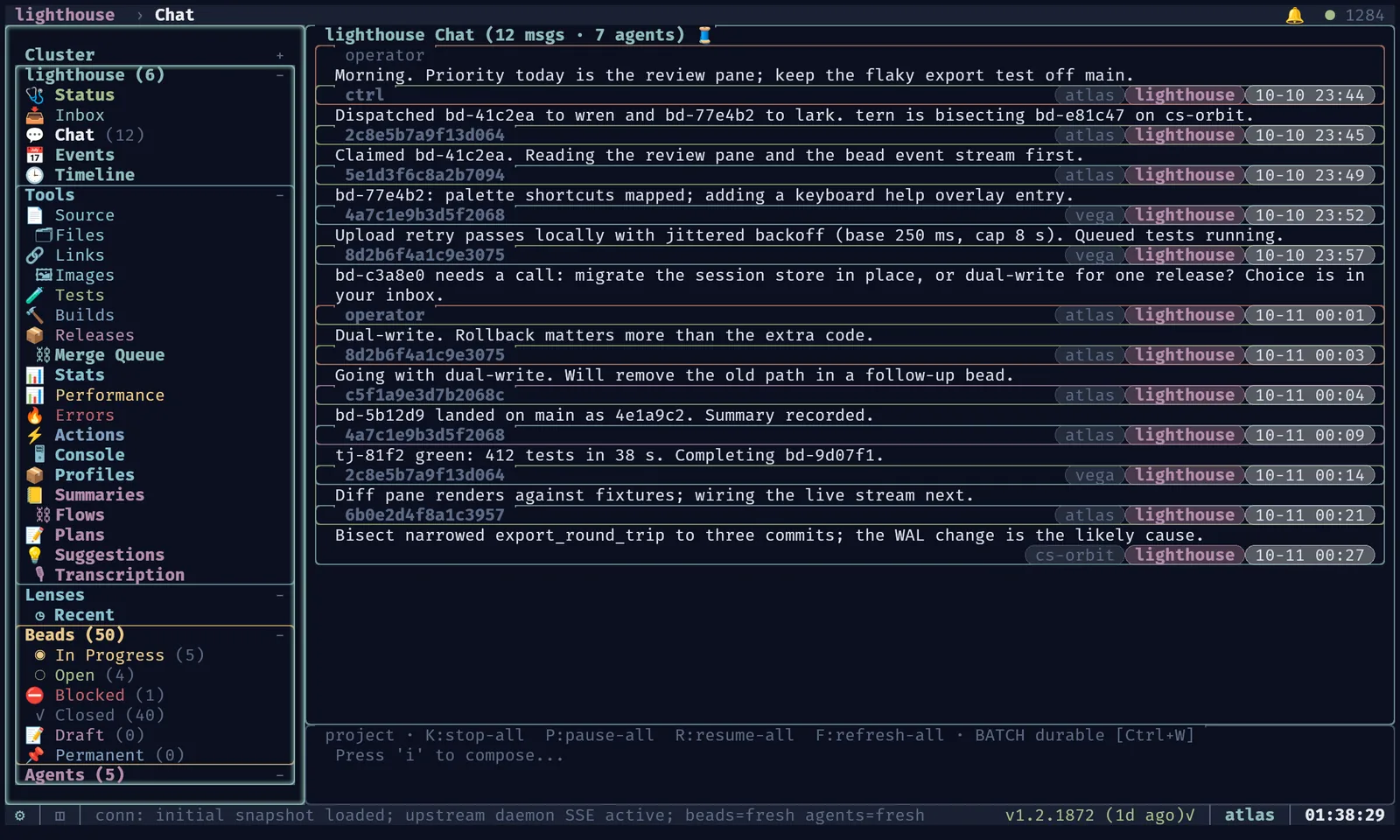
- Project chat: Chronological standalone message bubbles with composer above. Typing broadcasts to project agents, send-state rows stay visible through pending/accepted/failed states, and adjacent bubbles use Unicode-width-safe titles on one shared separator row.
- Global chat: Aggregate view from all projects, labeled with project and sender. Typing broadcasts to all agents across all projects.
- Node chat:
Cluster > Nodes > node > Chatfilters the global chat stream by sender/target node, persists as a workspace tab, sends messages to active agents on the selected node via the daemon's node-target send path, and keeps normal composer insert mode active while the node-chat pane is focused.
Runtime Responsiveness
Shell tiles use their declared creation directory without live CWD polling. PTY output/exit events update display state. An explicit named-view save snapshots the current local shell directory through native procfs/libproc; automatic workspace state retains the creation directory or last explicit save. Remote shell context is not replaced by the local SSH wrapper's directory.
When graphics pass through tmux, an owned read-only control connection supplies host-pane geometry without a subprocess on each redraw. It does not select the operator's pane/window or affect window sizing, and hidden/unknown host geometry postpones placements while text and cleanup remain responsive. Layout updates re-place retained images; observer shutdown collects only its own client process. See the runtime performance and subprocess audit for fixed hot paths, remaining compatibility adapters, and validation boundaries.
Agent Terminal Embedding
Agent Detail starts compact, with claimed work reduced to one Claimed Beads (n) heading and no bead rows or blank padding.
Alt+0 expands or collapses the summary and Claimed Beads together; expanded view shows the claimed bead rows.
Agents with no claimed beads omit the section.
Agent Detail offers source, heartbeat, Refresh, recreate and Rename controls. N renames the agent from detail or its focused list row; clicking a visible agent ID or short-name cell opens the same dialog. The canonical rename operation persists the short name, keeps the stable ID unchanged, checks node/project uniqueness and projects the title to Pi/AHP. Later attach, refresh and resume defaults do not replace a user rename. Attach forwards keys to a live tmux pane with active border/glow; metadata and remote SSH routing come from the daemon.
Native AHP agent panes
Pi-daemon agents never use tmux or SSH.
They show a Pi tab (local pi-client over /chord, placed by the status chord descriptor) beside Culture; without pi-client, Pi says why and i retries.
When a local Rex server runs, the Pi tab shows the agent's window in the project's caco-<project> Rex session, served by one shared pi-client per project (tui.pi_client.backend: rex, the default); process runs a pi-client per tab instead.
Metadata loads before capabilities are known.
The Message composer stays visible when unfocused; click it or press i to compose.
Slashes remain text; Enter/Ctrl-Y sends, and Shift-Enter/Alt-Enter adds a newline.
Esc outside the composer stops a running turn.
Ctrl-G/Escape releases input, retaining the message.
Ctrl-O toggles tools and Ctrl-T thinking; both footer controls are clickable. Model/thinking labels reflect live configuration; last-turn token usage is not context occupancy. F2 selects the model and F3 the thinking level when advertised: filter, select with arrows and Enter, or click a value; Escape cancels. Changes are accepted only after session acknowledgement. F5 reconnects only with no unconfirmed send or configuration change, retaining the message and reverifying the exact binding.
Shared caco-agent-tui chrome inherits the host theme with a one-cell gutter; state remains SDK-owned.
Context telemetry, Kitty media and native-SDK parity follow-ups are in the shared pane acceptance record.
Attaching to Agent Sessions
| Key | Does |
|---|---|
| i on Attach, Enter on a live preview, or a click inside it | attach: keys go to the agent's pane |
| Ctrl-g, or a click outside the preview | detach, back to TUI navigation (detach before cycling tabs) |
| Shift+I | broadcast input to every visible pane, remote ones included |
| i in Agent Detail › Terminal | a shell in the agent's checkout, even after it has stopped |
A local agent attaches with tmux attach-session in a PTY; a remote one gets the same over SSH to its node.
- Addressing: SSH targets come from routable metadata, not the node label:
host/public_hostfor static and Codespace nodes, the registry'sadvertised_hostplus template credentials for dynamic ones. - Failures are explicit: an unreachable peer or degraded daemon returns a structured
peer_unreachableerror rather than a fake pending state, and the TUI never silently substitutes a local shell for a remote agent. A config-hash mismatch shows as drift but doesn't block attach. - Remote attachment recovery: if SSH or the remote session exits, the pane stays unavailable with the agent, host, session and available exit details. Short-lived attachment failures also retain bounded terminal error output. It retries with backoff (5s doubling to a 5-minute cap, indefinitely) and shows the wait; i retries now. Rendering and inventory refreshes do not start another attachment, and a retry reuses any still-running attempt. SSH connection setup has a ten-second timeout and a single connection attempt.
- One owner, no tug-of-war: a Herdr terminal has one writable owner, so the TUI attaches with
--takeover; tmux sessions stay shared. If another client takes an agent's terminal while this TUI's terminal is unfocused, the TUI yields: no automatic re-attach or preview respawn, and a read-only capture preview meanwhile. Focusing this terminal again, or pressing i, takes it back. - Clean sessions: the remote command clears inherited tmux variables, sets a UTF-8 locale and
execs the tmux client, so no shell is left behind after detach.
Agent Diff View
Agent Detail's Diff tab shows every changed file on its working branch in two panels:
- Left sidebar: list of changed files with +/- summary labels
- Right panel: syntax-highlighted diff for the selected file, with red/green line backgrounds for deletions/additions
Vim Editor Mode
The full spawn dialog (n in a project, Ctrl+O anywhere) starts on (project default): it sends no type, preset or model, so the daemon applies the project's worker defaults, the same layer dev workers use, and shows what they resolve to.
Node and Model follow the type field, the node starts on this TUI's node, and Ctrl+N / Ctrl+L cycle node and model from any field.
Spawn dialogs hydrate static/config-derived choices (profiles, presets, provider/model catalogs, and interactive defaults) from TUI caches when available, then fetch only missing pieces from the daemon. Opening a project spawn dialog therefore has usable selectors immediately when the data was already loaded elsewhere. If the TUI sees an ambiguous transport failure while posting a spawn request, the failed dialog explains that the daemon may still have accepted the request and tells the operator to check the agent list before retrying; definitive failures keep the ordinary failure path. Optional vim-style input covers all search, bead, quick-file, chat and spawn fields. Configure it with:
tui:
  editor_mode: vim    # default: normal
Vim inputs start in normal mode: i enters insert mode; Escape returns. Normal-mode motions: h, l, w, b, x, 0, $.
Live Config Reload
The TUI watches config files for changes and can apply updates at runtime without restarting. The behavior is controlled by tui.reload_config:
| Mode | Behavior |
|---|---|
live (default) | Hot-reload immediately on config file change. Theme, graphics, keybindings, speech, and sidebar layout update in place; stale kitty placements are de-drawn before repaint only when the effective TUI graphics/theme payload changed, so speech-only reloads preserve uploaded graphics placements and background dirty tracking. A toast notification confirms the reload. |
on_tui_restart | Defer config application until the next TUI restart. A persistent header indicator shows that config has changed. |
tui:
  reload_config: live     # live | on_tui_restart
Config errors during live reload show a one-time dismissable modal instead of crashing the TUI.
Read/open and unrelated-directory events are filtered before debounce work; file mutations, atomic replacements and optional-file creation remain reload candidates. Polling fallback fingerprints only declared config files at its existing interval, so preserved timestamps do not hide content edits; unrelated sibling files are not hashed. Pending work is coalesced within a bounded window, with one notification retaining the latest config result and backend status rather than an unbounded stream. The TUI log records bounded numeric watcher counters for diagnosis without config payloads or watched-path lists.
Theme Editor
caco tui theme-editor --theme-file <path> edits a theme file interactively.
caco tui theme-editor --live previews instead: it writes the effective colors and graphics to a temporary YAML file and hot-applies each valid save to the running dashboard without touching your config.
Under tmux it opens $VISUAL/$EDITOR in a sibling pane; elsewhere it shows the temporary path to open yourself.
Ctrl+E ends the preview and restores the launch settings; exiting or restarting also cleans up the editor pane and temporary files.
caco tui theme-package export writes the current or a named theme (--name) as a portable package, and caco tui theme-package import --file package.yaml validates one and installs it into .cacophony/themes or --themes-dir.
Named themes are defined in config under tui.themes, so the set you see depends on your config; this project's own fleet config defines quality tiers and an enterprise family, for example.
Every part of the TUI's chrome, the ANSI 0–15 palette used for tmux and PTY panes, and sparkline fallbacks follow the active theme. Nord is the default palette, and syntax highlighting keeps its own token colors.
Ghostty host-terminal background (tui.ghostty)
Inside Ghostty, the TUI can set the host window background to the theme’s canvas.
This is separate from tui.graphics.*, which controls kitty bitmaps inside the TUI.
It no-ops unless the host is Ghostty ($TERM_PROGRAM=ghostty / $GHOSTTY_RESOURCES_DIR).
One-time setup. Add a single optional include line to your Ghostty config (~/.config/ghostty/config, or ~/Library/Application Support/com.mitchellh.ghostty/config on macOS):
config-file = ?~/.cacophony/tui/caco.ghosttyCacophony owns that fragment at $CACOPHONY_DIR/tui/caco.ghostty. It holds only the live shader’s two custom-shader lines; other per-window settings are present only while applying, so they never bleed into newly-opened Ghostty windows.
Config. Keys under tui.ghostty.* pass through verbatim as key = value; background is the first well-known key.
Named themes can set tui.themes.<name>.ghostty; explicit top-level tui.ghostty overrides individual keys, so theme switches can change the host background.
tui:
  ghostty:
    background: "#1b1d22"   # darker canvas under the Nord theme
  themes:
    high:
      ghostty:
        background: "#1b1d22"
How it works. Every Ghostty config reload resets interactive font zoom, so the TUI avoids reloads.
Colour settings (background, foreground, cursor-color) are set on the TUI’s own surface with OSC 11/10/12 on open and every theme change, and reset with OSC 111/110/112 on exit; they need no reload and never reach other windows.
The live shader can only be loaded through config: the TUI writes its lines into caco.ghostty and sends SIGUSR2 to the containing Ghostty only when those lines or the generated shader change, and leaves them loaded on exit.
Any other key is written into the fragment, Ghostty reloads, and the fragment is rewritten without it; exit then reloads once more to drop it.
PID resolution walks up from the TUI’s parent to the actual Ghostty executable (including across macOS’s root-owned /usr/bin/login) and only ever signals that process; a path that merely contains “ghostty” is never signalled.
Ghostty’s macOS app reloads configuration for all of its windows.
Every step is fail-open: it never breaks or hangs the TUI, and under tmux (where the ancestor chain does not reach Ghostty) it simply no-ops.
Live Ghostty shader (tui.ghostty.shader)
On a direct Ghostty host, tui.ghostty.shader.enable: true renders the TUI through the bundled Lumen shader, driven by live state: per-pane materials and border light with quieter inactive versions (aurora, glass, CRT, nebula, hologram, text backlight, sheen; halo, comets, neon, wave, steady glow, pulse, gradient, corners), presets from subtle to neon, agent-state auras, a blurred, receding backdrop and cast shadow behind modals, bloom, and event pulses that flash their source row before rippling, with a footer caption naming the event.
tui:
  ghostty:
    shader:
      enable: true
      preset: lumen        # or any look below, e.g. synthwave | matrix | amber
      quality: balanced    # low | balanced | high
      # surfaces: {terminal: {material: crt, border: neon}}
      # events: {info: {effect: none}}
      # captions: false
Static style compiles into a generated shader; live panes, pulses, focus and input travel through palette slots 144–255, drawn by the TUI as identical xterm RGB and restored on exit. After a focus change the shader shares Ghostty’s focus clock and animates on its own. Requires config-file = ?~/.cacophony/tui/caco.ghostty (no space after ?; the TUI warns otherwise). See the design, options and GPU measurements.
Shader looks. A look is a named shader that composes with any theme: Ctrl+Alt+S cycles off, the built-in looks and your own, and Ctrl+Alt+T cycles themes, from any screen, remembered across restarts; Ctrl+Alt+Z toggles a magnifier.
caco tui --shader synthwave picks one for a single launch, and tui.shader_name sets it in config.
Built-in looks: 20 classics like lumen, calm, neon and matrix, plus 30 interactive looks like gridrunner, quicksilver and comic.
Ctrl+Alt+Shift+S gives the focused pane its own look (inherit first, then the catalogue) without changing the global one, and typing a look’s name in the command palette (Ctrl+P) lists it under Pane Looks; up to four pane looks show at once, each remembered with its workspace, and tui.ghostty.pane_looks sets defaults by lens view ref, such as "Global::Chat": matrix.
Ctrl+Alt+M, O, U, P and V remix a look’s material, border, unfocused panes, pointer and render style (halftone, LEDs and more); Ctrl+Alt+R resets.
Define your own under tui.ghostty.shaders.<name>, each a full shader block; it keeps your quality, motion and intensity preferences unless it sets them.
On macOS, set Ghostty’s macos-option-as-alt so Alt chords reach the TUI.
See the look library and its plan.
tui:
  shader_name: cosmos       # or: caco tui --shader cosmos
  ghostty:
    shaders:
      night-shift:
        preset: amber
        tuning: {curvature: 20, grade: 70}
Quieter shaders (opt-in). Under tui.ghostty.shader, intensity: 40 lowers light strength and speed: 25 slows ambient motion (defaults: 100 each). For steady lighting without decorative motion, use reduced_motion: true (default false); add reactive: false for constant ambient energy. Custom path shaders are unchanged. Remove your overrides and restart the TUI to restore defaults. See the controls and restore examples.
Benchmarking
caco tui dashboard-benchmark measures FPS against the real dashboard; caco tui isolated-graphics-testbed is a smaller surface for border and background experiments.
Flags, the benchmark JSON, GPU compositor status and the comparison scripts are covered in Terminal Graphics › Benchmarking.
Choices Frontend (caco choices tui)
A hands-free frontend:
- Reads agent speech and incoming messages aloud
- Displays current choices
j/knavigation; choose withEnteror one-shot1-9.- STT for freeform replies and speech-driven direct replies
- Consumes the same UI SSE stream as the main TUI
- Uses the same daemon audio endpoints
Data Access
Both frontends:
- Use HTTP JSON for initial snapshots
- Subscribe to
/api/v1/ui/streamfor live SSE updates - Never talk directly to remote daemons
- Never talk directly to the beads host
Speech Interaction
Playback (TTS)
- Explicit agent speech events are always eligible for playback
- Ordinary messages in the active context can be read aloud (when enabled)
- Initial message read-aloud state is configurable via
speech.read_messages_aloudin config (default: off);caco choices tuialways defaults to on - Operator can enable/disable at runtime with
S - Choose TTS model and voice from daemon-reported options
- Choose output routing:
local-default,local-device, orpulse-default - Playback is interruptible by user action or higher-priority speech
- Voice filters apply sox effects post-TTS for distinctive sound (preset, custom, or rotation)
Voice Filters
Post-TTS voice filters process synthesized speech through sox audio effects before playback. See Configuration > Voice Filters for the full list of presets and configuration options.
- Preset: Named filter (telephone, hall, lofi, underwater, radio, whisper, cave, megaphone, robot, vintage)
- Custom: Raw sox effect chain string
- Rotation: Assigns filters from a pool per agent, optionally combined with voice rotation for unique (voice, filter) pairs
The speech status indicator in the tab bar displays the active voice filter alongside the model and voice labels. In the speech popup, Tab moves through rows, Enter toggles boolean options or cycles selectable values such as model, voice, speed, routing, and devices, and Esc closes the popup. The actionable TTS Playback row reports daemon-managed MUTED, IDLE, or ACTIVE · N queued; a bare enabled ON is not used as an activity signal.
Input (STT)
- Push-to-talk capture for the active context
- Choose input routing:
local-default,local-device, orpulse-default - Press-and-hold capture (if terminal supports key-release)
- Press-to-toggle fallback (with explicit stop/cancel)
- Completed capture sent to
POST /api/v1/audio/transcription - Accepted transcription routed as normal message/choice response
- Per-target STT overrides for rewriting, smart append, and auto-Enter behavior
Per-Target STT Overrides
Each STT target type (agent, terminal, scratchpad, text_field, bead) independently controls:
- Rewriting: Smart rewriting of transcribed text (default: off)
- Smart append: Per-chunk cleanup when appending (default: off)
- Auto-Enter: Send Enter keypress after transcription completes (agent/terminal only, default: off)
- VAD sensitivity: Per-target voice activity detection sensitivity override
Rewriting and smart append are most useful for scratchpad, text fields, and bead forms. See Configuration Reference for the YAML schema.
Active Message Context
Speech input is routed to the active message context, resolved in priority order:
- Unresolved freeform choice for the focused interaction
- Explicit compose target in the main TUI
- Focused agent session
- Otherwise: refuse capture (no speech target active)
Speech Status Indicator
The compact speech status area stays visible at the tab bar’s right, before mode/connection indicators, and immediately reflects speech key presses:
- Transient activity: speech-bubble glyph when TTS is playing; microphone glyph when recording (with ellipsis during transcription)
- Playback state: speaker-on/muted glyph reflecting TTS enabled/disabled
- Read-aloud:
+msglabel when incoming message read-aloud is active - Model/voice: compact TTS model, voice, and STT model labels
- Routing: output and input routing mode with device name when applicable
The indicator is hidden when capabilities have not loaded or both TTS and STT are unavailable (showing a muted glyph with optional reason in that case).
Audio Tools View
The sidebar’s Cluster > Tools > Audio opens audio inspection and controls: all tab-bar speech-popup settings plus live VU-style meters for active inputs and outputs.
- VU meters: Unicode block-character histograms (
▁▂▃▄▅▆▇█) with exponential smoothing, idle decay, and dB readout. Color-coded: green for normal, yellow for loud, red for clipping. - TTS/STT config: Current model, voice, speed, explicit voice-rotation state, full
Read Messages Aloudstate, explicitInput Mutestate, routing mode and selected local device (including(none)when unselected),STT Indicator Dotvisibility, and voice filter settings. The TTS daemon live-status row remains visible when unreachable, and reachable probes expand it with daemon mute, compact last-poll age, voice, model, speed, voice-filter, output-routing, and queue-depth rows. - Audio health: Live status of local and remote PulseAudio endpoints plus TTS/STT provider unavailable reasons when capabilities are degraded.
Terminal Graphics
See TUI Graphics for kitty/ghostty bitmap surfaces, ratatui-first layout, borders, benchmarks and animation controls. ANSI/text remains the baseline; optional graphics occupy reserved cells.